Getting Structured Data Out of Images with Granite Vision 4.1
Vision models narrate. Hand one a receipt and you get three paragraphs describing it — and now you're writing a parser for natural language, which is exactly what you were trying to avoid.
The usual workaround is to append "respond with JSON matching this schema" to your prompt, hope
the model complies, catch the json.JSONDecodeError when it doesn't, and wonder why extracting
a number from a picture turned into a reliability project.
There's a cleaner path.
Running locally
Granite Vision 4.1 runs locally on Ollama. No API key, no cloud bill:
ollama pull hf.co/ibm-granite/granite-vision-4.1-4b-GGUF:Q4_K_M
uv add mellea pillow
The problem
Here's the receipt we'll work with — a deli order with non-trivial quantities and a partially smudged subtotal (thermal printer wear):
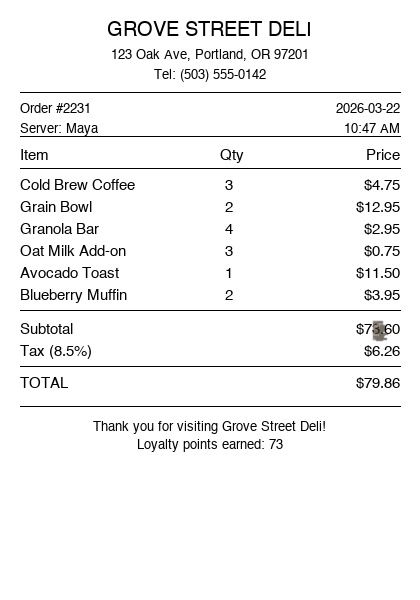
Start with the naïve approach: ask the model to describe it.
from mellea import start_session
from mellea.core import ImageBlock
from PIL import Image

m = start_session(model_id="hf.co/ibm-granite/granite-vision-4.1-4b-GGUF:Q4_K_M")
img = ImageBlock.from_pil_image(Image.open("receipt.jpg"))

result = m.instruct("What's on this receipt?", images=[img])
print(result)
Output:
"This receipt is from Grove Street Deli in Portland, dated March 22nd 2026,
 order #2231. It lists three cold brew coffees at $4.75 each, two grain bowls
 at $12.95 each, four granola bars at $2.95 each, three oat milk add-ons at
 $0.75 each, one avocado toast at $11.50, and two blueberry muffins at $3.95
 each. The subtotal is $73.60, tax at 8.5% is $6.26, for a total of $79.86."
Output will vary — models describe the same receipt differently. The structure of the problem is the same.
Readable. Useless as data. You can't do result.total or result.items[0].unit_price.
The return type is the extraction schema
Define what you want as a Pydantic model and pass it to format=. Mellea uses constrained
decoding to guarantee the output matches — no prompt-engineering the JSON shape, no parse
errors to catch.
from pydantic import BaseModel
from mellea import start_session
from mellea.core import ImageBlock
from mellea.backends.model_options import ModelOption
from PIL import Image


class LineItem(BaseModel):
    description: str
    quantity: int
    unit_price: float


class Receipt(BaseModel):
    vendor: str
    date: str
    items: list[LineItem]
    subtotal: float
    tax: float
    total: float


m = start_session(
    model_id="hf.co/ibm-granite/granite-vision-4.1-4b-GGUF:Q4_K_M",
    model_options={ModelOption.CONTEXT_WINDOW: 4096},
)
img = ImageBlock.from_pil_image(Image.open("receipt.jpg"))

result = m.instruct("Extract the receipt data.", images=[img], format=Receipt)
receipt = Receipt.model_validate_json(str(result))

print(receipt.vendor)            # "Grove Street Deli"
print(receipt.total)             # 79.86
print(receipt.items[0].quantity) # 3
ImageBlock.from_pil_image() converts any PIL image to the base64 PNG the backends expect.
format=Receipt switches the model into constrained decoding. model_validate_json gives you
a fully typed Python object with IDE autocomplete on every field.
model_options={ModelOption.CONTEXT_WINDOW: 4096} is worth setting explicitly. Ollama
otherwise defaults to this model's full 131072-token context window, which pulls close to
9 GB of memory for a job that only needs a few thousand tokens — one image, a short
instruction, a small JSON object back. Capping it at 4096 drops that to about 2.5 GB with
no change in output quality.
When the type isn't enough
Pydantic catches structural failures: wrong shape, missing fields, values that can't be coerced.
It won't catch semantic ones. If the model reads the total as -22.19, that's valid JSON.
If it parses the date as "March 15" instead of "2026-03-15", the field is populated —
it's just wrong.
requirements= handles this. Pass plain-English constraints; if the first attempt fails one,
Mellea repairs and retries with the failure reason fed back into the prompt:
from mellea.stdlib.sampling import RepairTemplateStrategy

result = m.instruct(
    "Extract the receipt data.",
    images=[img],
    format=Receipt,
    requirements=[
        "total must be a positive number",
        "date must be in ISO 8601 format (YYYY-MM-DD)",
        "each item's unit_price must be a positive number",
    ],
    strategy=RepairTemplateStrategy(loop_budget=3),
)
receipt = Receipt.model_validate_json(str(result))
Worth being clear about the limit: requirements validate the extracted values, not whether they match what's physically in the image. A requirement catches the model hallucinating a negative total; it can't verify the number on screen was $79.86 rather than $78.86. For that you need an external check.
When to reach for IVR
IVR — Instruct, Validate, Repair — is Mellea's loop for catching and fixing semantic
mistakes that constrained decoding alone can't. If you have a concrete verifiable property — something independent of the image — wire it as a
validation_fn. Mellea runs it on each attempt and feeds the failure reason back into the
repair prompt if it fails.
Receipt arithmetic is the natural case here: the sum of every line item (quantity × unit price)
must equal the subtotal. The model reads each line independently, so with non-round quantities
like 3 × $4.75 and 4 × $2.95, it's easy for the accumulated total to drift — especially
when the printed subtotal is partially obscured. The validation function catches it and tells
the model exactly what went wrong:
from mellea.stdlib.requirements import req, simple_validate
from mellea.stdlib.sampling import RepairTemplateStrategy


def check_line_items(json_str: str) -> tuple[bool, str]:
    r = Receipt.model_validate_json(json_str)
    computed = round(sum(i.quantity * i.unit_price for i in r.items), 2)
    if abs(computed - r.subtotal) > 0.01:
        return False, f"line items sum to {computed}, subtotal shows {r.subtotal}"
    return True, ""


result = m.instruct(
    "Extract the receipt data.",
    images=[img],
    format=Receipt,
    requirements=[
        "total must be a positive number",
        req("line items sum to subtotal", validation_fn=simple_validate(check_line_items)),
    ],
    strategy=RepairTemplateStrategy(loop_budget=3),
)
receipt = Receipt.model_validate_json(str(result))
When the check fails, Mellea feeds the error string back into the next attempt —
"line items sum to 73.60, subtotal shows 70.60" — so the model knows which numbers
to revisit rather than starting from scratch.
The general progression: format= alone → requirements= for semantic constraints →
validation_fn when you have something concrete to verify programmatically. Most image
extraction stops at step two. Reach for validation_fn when you'd be writing the same check
in post-processing anyway — it belongs in the prompt loop, not after it.
Swapping backends
ImageBlock is backend-agnostic. This post uses Ollama throughout; the only thing that
changes for another backend is the session setup:
# Ollama (this post)
from mellea import start_session
m = start_session(
    model_id="hf.co/ibm-granite/granite-vision-4.1-4b-GGUF:Q4_K_M",
    model_options={ModelOption.CONTEXT_WINDOW: 4096},
)

# Any OpenAI-compatible endpoint (vLLM, cloud)
from mellea import MelleaSession
from mellea.backends.openai import OpenAIBackend
m = MelleaSession(OpenAIBackend("ibm-granite/granite-vision-4.1-4b",
                                base_url="http://localhost:8080/v1", api_key="mlx"))
The instruct call — images=, format=, requirements=, strategy= — is identical
across all backends.
From narration to data
Vision models are already good at reading documents — they just default to telling you about
them rather than handing you the data. format= shifts that.
The more important thing to understand about requirements= and validation_fn is what they
guarantee. Detection is reliable: the validation layer always surfaces a mismatch — if the
arithmetic is wrong, you'll know. Repair depends on model capacity. A 4b model working from a
partially obscured image will not always correct itself in three tries; a larger model usually
will. The point of wiring the check programmatically is that a silent wrong answer is no longer
possible. Repair success is a separate question.
Going further
- Use Images and Vision Models — image loading, backend configuration, multi-image prompts
- Enforce Structured Output —
format=,@generative, and constrained decoding in detail - The Requirements System —
how
Requirement,ValidationResult, andsimple_validatework together - Instruct-Validate-Repair — the IVR loop, sampling strategies, and repair prompts explained
- Write Custom Verifiers — validation functions beyond simple string checks